Sometimes in reactive programming its difficult to understand logic or code when we are using multiple operators, it’s not always easy to read through the observable chain, so in order to better understand the program and to troubleshoot the code we often use the tap operator to log statements to the console.
For example: Say, we have a search input on the page and we want to look at the search values user is inputting. For this, we certainly use the tap operator to log the search string right?. See below.
fromEvent<any>(this.input.nativeElement, 'keyup')
        .pipe(
            tap(search => console.log('search input:', search))
        );
This is fine, but, what if we want to log different statement?, we are going to use the tap operator again, and again maybe on other observables!!. This is not very productive and impossible to scale.
For this purpose we can actually create a custom operator to log statements to the console and also do much more. See below.
export const debug = (message: string) =>
    (source: Observable<any>) => source
        .pipe(
            tap(val => {
                console.log(message + ': ', val);
            }));
Here, we have created a custom operator called debug and it simply logs the message and value.
This operator can also be easily scaled to take different log levels and log statements accordingly, i.e, conditionally output the message depending on the logging level. See below.
// Define the logging levels
export enum LoggingLevel {
    INFO,
    DEBUG,
    ERROR
}

// log the message based on the logging level
export const debug = (level: number, message: string) =>
    (source: Observable<any>) => source
        .pipe(
            tap(val => {
                if (level === LoggingLevel.INFO) {
                    console.log(message + ': ', val);
                } else if (level === LoggingLevel.DEBUG) {
                    console.warn(message + ': ', val);
                } else if (level === LoggingLevel.ERROR) {
                    console.error(message + ': ', val);
                }
            }));
Here, we have defined multiple logging levels and for each log level we are logging different type of statement to the console.
Finally apply the debug operator on the input search. See below.
fromEvent<any>(this.input.nativeElement, 'keyup')
        .pipe(
            // For console.log
            debug(LoggingLevel.INFO, 'search'),
            // For console.warn
            debug(LoggingLevel.DEBUG, 'warning'),
            // For console.error
            debug(LoggingLevel.ERROR, 'error'),
        );
Now, as you type in the input search you should see the logging statements on the console, like below.
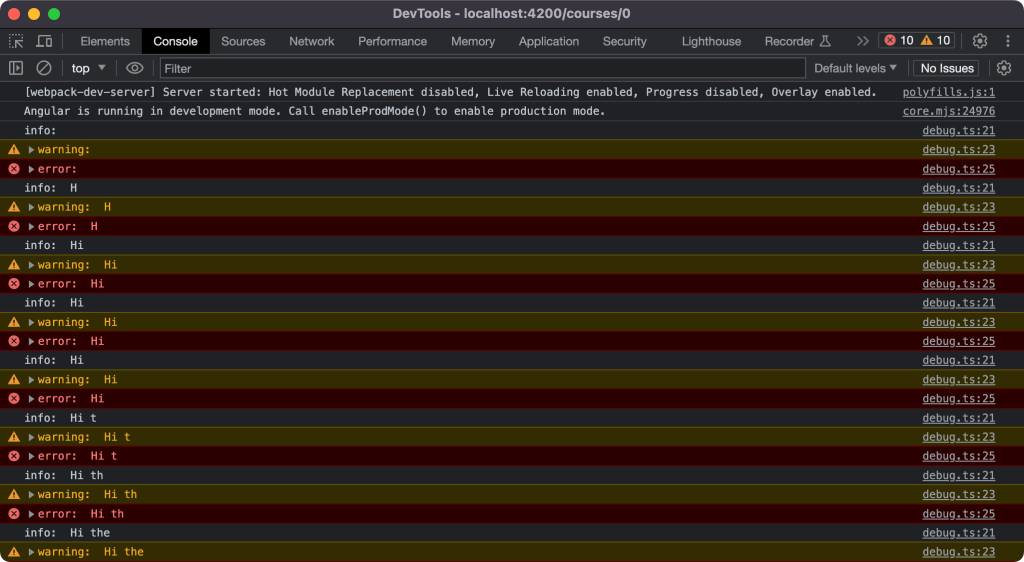
Our custom RxJS debug operator is working!!.
 Kumar Gandhi Koppolu