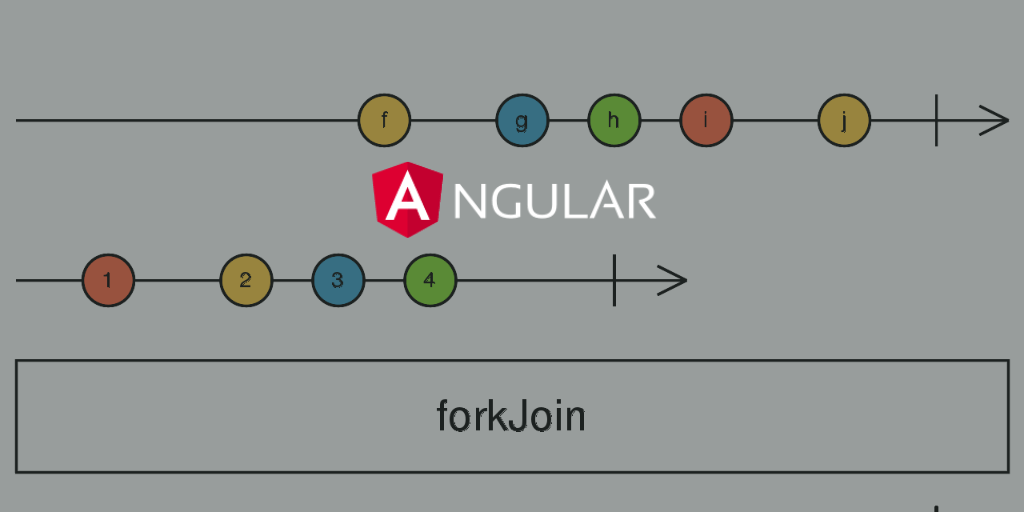
forkJoin is an operator in RxJS which takes one more observables as inputs and then wait until all observables to emit and complete.
One popular use case in Angular where we should use forkJoin is while performing multiple HTTP requests. There will be a use case where we would want to finish few HTTP requests in one go because the data fetched from one API call or HTTP request might be dependent on other API call data.
For example, say we are fetching all the users in an application, however we would also want to fetch all the user roles too so we can map the users data to the roles accordingly in the grid or make some decisions. So the solution for this is to use the forkJoin operator pass these two HTTP request as the inputs and wait for these two HTTP requests to complete, once done, we will have all the data we need in a single observable array so we can proceed to parse the data.
Lets, see some code example.
// Service class with two mock API functions to fetch the data.

import { Injectable } from '@angular/core';
import { Observable, of } from 'rxjs';
import { delay } from 'rxjs/operators';
import { IUser } from '../interfaces/user.interface';
import { MOCK_USER_ROLES, MOCK_USERS_DATA } from '../constants';

@Injectable({
    providedIn: 'root',
})
export class UserService {

    // Mock function to fetch the users data.
    getUsers(): Observable<IUser[]> {
        return of(MOCK_USERS_DATA).pipe(delay(2000));
    }

    // Mock function to fetch the user roles.
    getUserRoles(): Observable<string[]> {
        return of(MOCK_USER_ROLES).pipe(delay(2000));
    }
}
// Mock data for our service requests.

import { IUser } from './interfaces/user.interface';

// Mock users data
export const MOCK_USERS_DATA: IUser[] = [
    {
        id: '1',
        email: 'jackbing@gmail.com',
        roles: ['Student'],
        displayName: 'Jack Bing',
    },
    {
        id: '2',
        email: 'chandlerbing@gmail.com',
        roles: ['Super Admin'],
        displayName: 'Chandler Bing',
    },
    {
        id: '3',
        email: 'appAdmin@gmail.com',
        roles: ['Teacher'],
        displayName: 'Admin',
    },
];

// Mock user roles data
export const MOCK_USER_ROLES: string[] = ['Student', 'Super Admin', 'Teacher'];
// User interface, defines the type of our users data.

export interface IUser {
    id: string;
    email: string;
    password?: string;
    displayName: string;
    photoURL?: string;
    emailVerified?: boolean;
    roles: string[];
}
import { Component, OnInit } from '@angular/core';
import { UserService } from './services/user.service';
import { forkJoin } from 'rxjs';
import { IUser } from './interfaces/user.interface';

@Component({
    selector: 'app-root',
    templateUrl: './app.component.html',
    styleUrls: ['./app.component.scss']
})
export class AppComponent implements OnInit {
    users: IUser[] | undefined;

    userRoles: string[] | undefined;

    constructor(private _userService: UserService) {}

    ngOnInit() {
        this.getUsersData();
    }

    // We are using the forkJoin operator for the two requests from the service class.
    getUsersData() {
        forkJoin({
            users: this._userService.getUsers(),
            userRoles: this._userService.getUserRoles(),
        }).subscribe(
            ({ users, userRoles }) => {
                this.users = users;
                this.userRoles = userRoles;
            },
            (error) => {
                console.log(error);
            }
        );
    }
}
Above code sample function getUsersData is where we are using the forkJoin to make multiple HTTP requests and then we process the response from all the requests once all the requests are completed!!.
 Kumar Gandhi Koppolu
One thought on “Using forkJoin in Angular to perform multiple HTTP requests but wait until all done.”