
As per the docs A DocumentReference refers to a document location in a Firestore database [READ]. In simple terms, it creates a relation between two collections. Let’s look at Firestore Database with the actual reference.
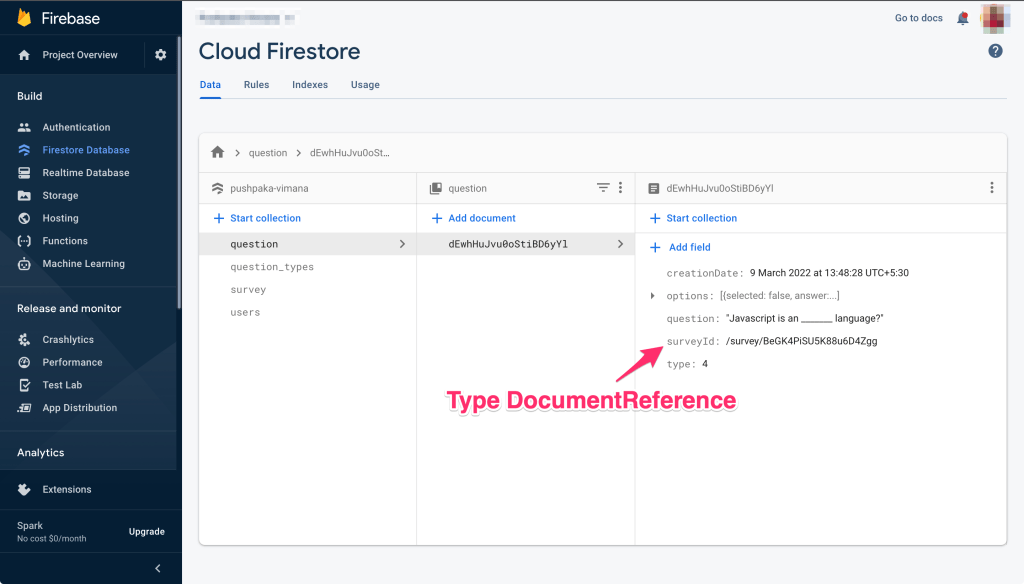
From the above screenshot, every document in question collection actually refers to a document in survey collection. That is the relation between those two collections. And once we have established such a reference there are lot more things we can do with it, like, apply a filter query on question collection!!.
In Angular application when you create the interface or class for above question collection you can set the type of the property surveyId as DocumentReference. See below code sample.
import { DocumentReference } from '@angular/fire/compat/firestore/interfaces';

export interface IQuestion {
    id?: string | number;
    type: string;
    question: string;
    options?: string | number | IOption | IOption[];
    surveyId?: DocumentReference;
    creationDate?: Date;
}

export interface IOption {
    selected: boolean;
    answer: string;
}
Okay, so, we have defined the type and collection, now, how do you add a document to the collection in Angular. See below code sample.
saveQuestion(question: IQuestion, surveyId: string) {
    const surveyDoc = this.firestore
        .collection(COLLECTION_SURVEY)
        .doc(surveyId);
    question.surveyId = surveyDoc.ref;
    return this.firestore.collection(COLLECTION_QUESTION).add(question);
}
Now to get the questions belonging to a survey you can write a simple query function. See below code sample.
getQuestionsForSurvey(surveyId: string) {
    const surveyDoc = this.firestore
        .collection(COLLECTION_SURVEY)
        .doc(surveyId);
    return this.firestore
        .collection(COLLECTION_QUESTION, (ref) =>
            ref.where('surveyId', '==', surveyDoc.ref)
        )
        .snapshotChanges();
}
Please leave a comment if there is something more you would want me to share.
Versions
- @angular/cli@~12.2.6
- @angular/fire@^7.1.1
**Soon I will share the complete code on Github.
 Kumar Gandhi Koppolu