In this post we have seen how to install the jspdf library in an Angular project and export a simple PDF.
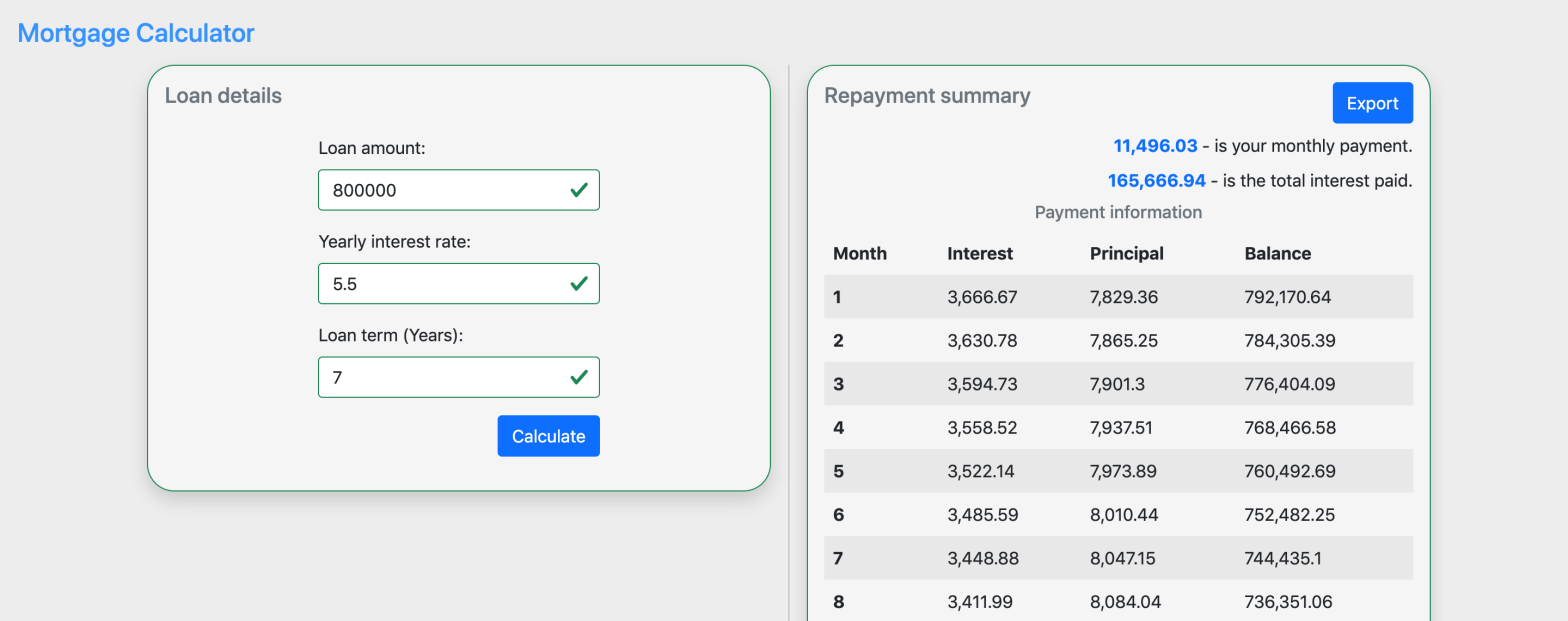
Here we will see how we can create a table (with table like data) with jspdf APIs with real data and export to PDF.
Lets say we want to export below table data in UI to PDF.
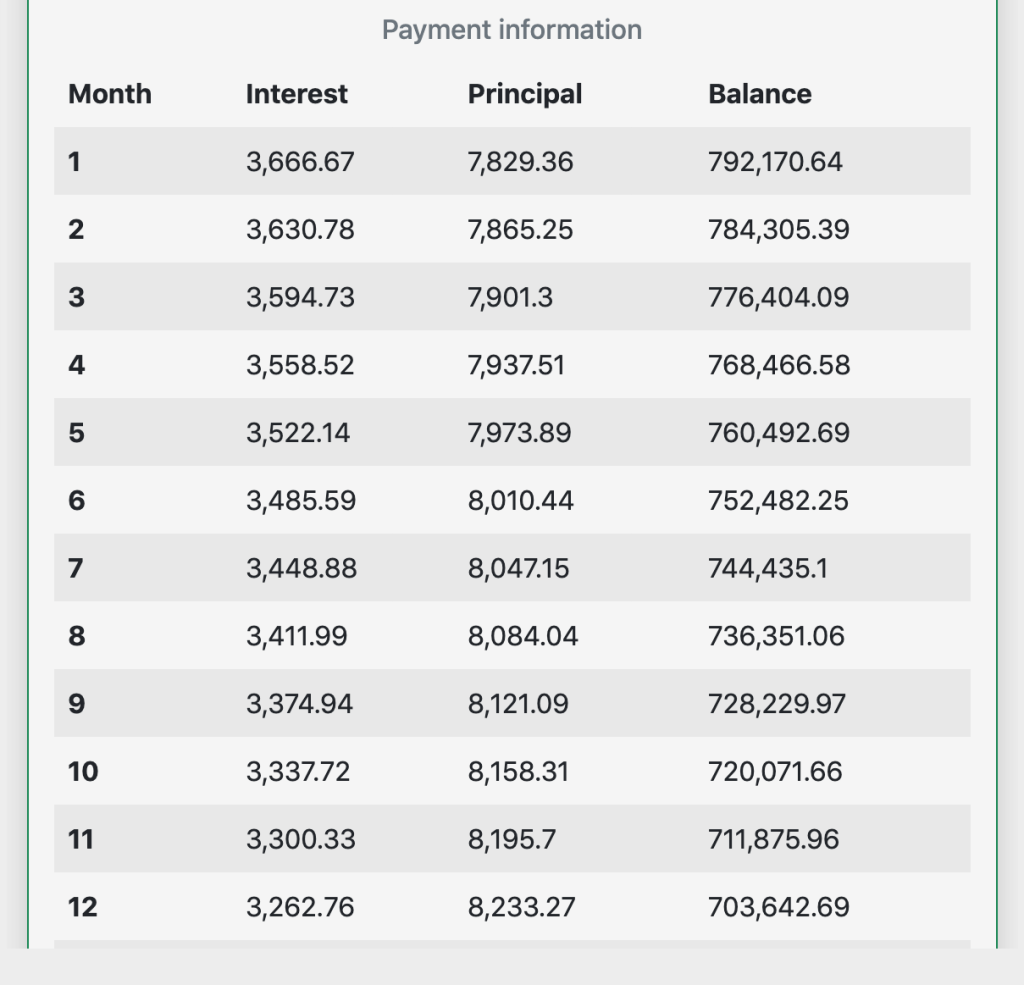
And the data for above table is maybe fetched from API call or computed in UI, but lets say we have the data, like, below in an array variable.
monthlyPayments = [
   {
      "Month":"1",
      "Interest":"3,666.67",
      "Principal":"7,829.36",
      "Balance":"792,170.64"
   },
   {
      "Month":"2",
      "Interest":"3,630.78",
      "Principal":"7,865.25",
      "Balance":"784,305.39"
   },
   {
      "Month":"3",
      "Interest":"3,594.73",
      "Principal":"7,901.3",
      "Balance":"776,404.09"
   },
   {
      "Month":"4",
      "Interest":"3,558.52",
      "Principal":"7,937.51",
      "Balance":"768,466.58"
   },
   {
      "Month":"5",
      "Interest":"3,522.14",
      "Principal":"7,973.89",
      "Balance":"760,492.69"
   },
   {
      "Month":"6",
      "Interest":"3,485.59",
      "Principal":"8,010.44",
      "Balance":"752,482.25"
   },
   {
      "Month":"7",
      "Interest":"3,448.88",
      "Principal":"8,047.15",
      "Balance":"744,435.1"
   },
   {
      "Month":"8",
      "Interest":"3,411.99",
      "Principal":"8,084.04",
      "Balance":"736,351.06"
   },
   {
      "Month":"9",
      "Interest":"3,374.94",
      "Principal":"8,121.09",
      "Balance":"728,229.97"
   },
   {
      "Month":"10",
      "Interest":"3,337.72",
      "Principal":"8,158.31",
      "Balance":"720,071.66"
   }
   ...
]
Now lets use the table function from jspdf library and also use above table data to create the PDF and export it.
exportToPDF() {
        // Creating a unique file name for my PDF
        const fileName = 'table.pdf';
        const doc = new jsPDF();
        doc.setFont('helvetica', 'normal');
        doc.setFontSize(14);
        doc.table(
            10,
            95,
            this.monthlyPayments,
            this._createHeadersForPdfTable([
                'Month',
                'Interest',
                'Principal',
                'Balance',
            ]),
            { autoSize: false }
        );
        doc.save(fileName);
    }
When we call above function we should see the pdf exported with our sample table data.
And the function _createHeadersForPdfTable is a simple utility function used to create the headers for our table. See below.
private _createHeadersForPdfTable(keys: string[]) {
        const result: CellConfig[] = [];
        for (let i = 0; i < keys.length; i += 1) {
            result.push({
                name: keys[i],
                prompt: keys[i],
                width: 55,
                align: 'center',
                padding: 10,
            });
        }
        return result;
    }
Note: If you have observed the table data, all the numbers in the array variable monthlyPayments are all converted to strings, this was done intentionally. For some reason only strings are working. Might be a bug in jspdf!!.
Conclusion
- We have see sample table data that we wanted to export to PDF.
- We have used the table method from jspdf library to create the PDF.
- We have successfully exported our table data to PDF.
Checkout complete code on Github.
 Kumar Gandhi Koppolu
One thought on “Export table PDF in Angular with JSPDF.”