We have already learned how to setup eslint and prettier in angular app. But this time we are going to setup style lint.
Check below link for quick reads.
Lets get started, goto the angular project on the terminal and follow below steps.
Step 1
npm install --save-dev stylelint stylelint-config-sass-guidelines
Above command installs the stylelint and stylelint linter config (plugin) based on sass guidelines. The style linter (stylelint-config-sass-guidelines) or plugin will make sure we are linting our styles based on the sass guidelines.
Step 2
Create .stylelintrc.json (config file for stylelint) at the root of the angular app and add below configs.
{
  "extends": "stylelint-config-sass-guidelines",
  "rules": {
    "indentation": 4,
    "max-nesting-depth": null,
    "selector-max-compound-selectors": null,
    "color-named": null,
    "order/properties-alphabetical-order": null,
    "shorthand-property-no-redundant-values": null,
    "selector-pseudo-element-no-unknown": [
      true,
      {
        "ignorePseudoElements": "ng-deep"
      }
    ],
    "selector-no-qualifying-type": null,
    "selector-class-pattern": null
  }
}
.stylelintrc.json contains all our style linting rules and we have added few basic rules. Please check link for complete details about the plugin and all the rules.
Style lint setup for the angular project is complete. Now lets add few scripts to package.json file to make life bit better.
"stylelint": "stylelint \"src/**/*.scss\"",
"stylelint:fix": "stylelint \"src/**/*.scss\" --fix"
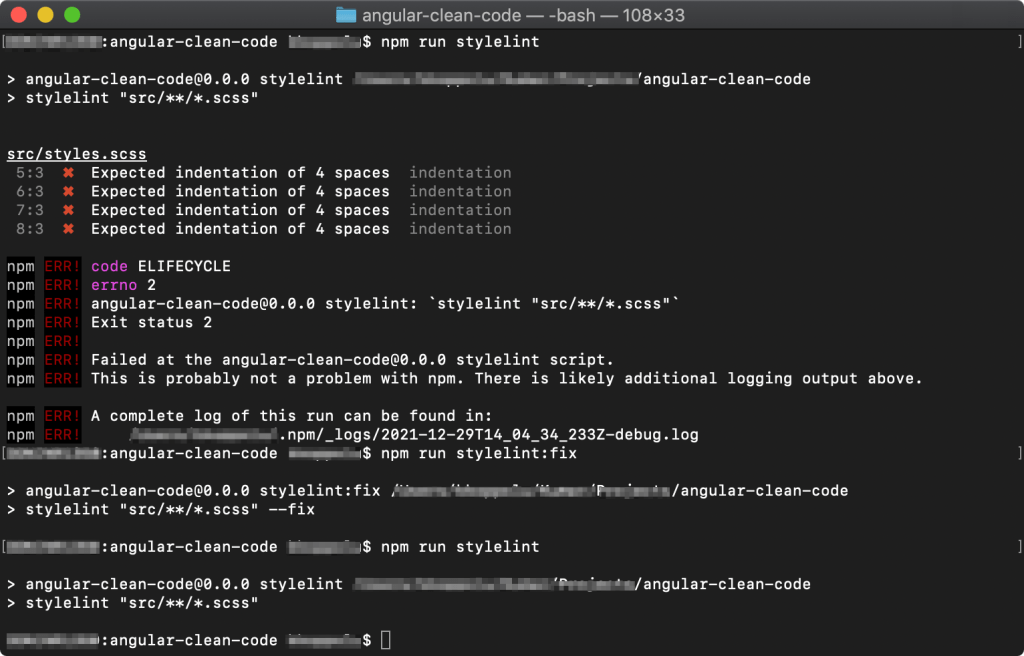
Above screenshot shows our new scripts at package.json in action.
Checkout Github Repo for the sample project.
 Kumar Gandhi Koppolu