Before proceeding I request readers to have working knowledge about Angular (web application framework), keep a sample Angular project ready and also have Bootstrap installed on the project!.
Now thats out of the way let us get started with post. Consider we have a form like below.
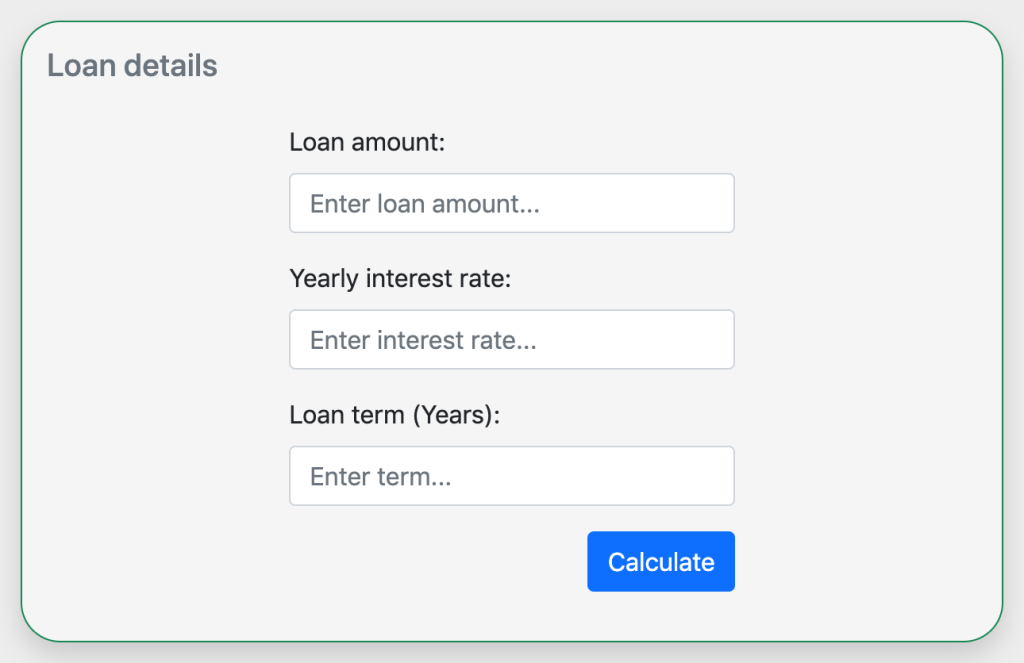
And our form in template file will look like below.
<form [formGroup]="form">
    <h5 class="text-secondary">Loan details</h5>
    <div class="row py-3">
        <div class="col-md-3"></div>
        <div class="col-md-6">
            <div class="mb-3">
                <label for="loanAmount" class="form-label">Loan amount:</label>
                <input
                    type="text"
                    class="form-control"
                    id="loanAmount"
                    placeholder="Enter loan amount..."
                    formControlName="loanAmount"
                    required/>
            </div>
            <div class="mb-3">
                <label for="interestRate" class="form-label">Yearly interest rate:</label>
                <input
                    type="text"
                    class="form-control"
                    id="interestRate"
                    placeholder="Enter interest rate..."
                    formControlName="interestRate"/>
            </div>
            <div class="mb-3">
                <label for="loanTerm" class="form-label">Loan term (Years):</label>
                <input
                    type="text"
                    class="form-control"
                    id="loanTerm"
                    placeholder="Enter term..."
                    formControlName="loanTerm"
                    required/>
            </div>
            <div class="col-12">
                <button
                    class="btn btn-primary float-end"
                    type="submit"
                    (click)="validateForm()">
                    Calculate
                </button>
            </div>
        </div>
        <div class="col-md-3"></div>
    </div>
</form>
If you notice, we are actually using Reactive forms in Angular rather than Template-driven forms because these are more flexible, you will see. Feel free to read about it. And don’t forget to import the modules FormsModule, ReactiveFormsModule.
We have few directives like formGroup to initialise the form , formControlName in inputs to register the controls to form and on button click we are calling a function to take action. So let’s initiate the form and declare the validateForm function.
// Declare form group
this.form = this._fb.group({
                loanAmount: [
                    '',
                    Validators.compose([
                        Validators.required,
                        Validators.pattern(INTEGER_REGEXP),
                    ]),
                ],
                interestRate: [
                    '',
                    Validators.compose([
                        Validators.required,
                        Validators.pattern(FLOATING_REGEXP),
                    ]),
                ],
                loanTerm: [
                    '',
                    Validators.compose([
                        Validators.required,
                        Validators.pattern(INTEGER_REGEXP),
                    ]),
                ],
                });
// On submit button handler. Maybe you need to calculate the loan...
validateForm() {
        // Flag to indicate if uses clicked the Calculate button.
        this.isFormSubmitted = true;
        if (this.form.valid) {
           // Do the loan calculation
        }
}
// Integer regexp
export const INTEGER_REGEXP = /^[0-9]*$/;
We have declared the form, added the needed validators (using the reactive forms we are able to correctly validate the state of the form input) and declared the Calculate button click handler. Also, take note we have added a pattern validator to the inputs.
Now it’s time to add the validations to form template using Bootstrap. To achieve this we are going to use few CSS selectors from Bootstrap CSS framework and others.
- was-validated – This selector is needed on the form tag itself if the form is submitted.
- is-invalid – We need to add this selector to form input controls if the form is submitted and if there are errors on the control.
- invalid-feedback – We can use this selector to show the error message below the input control.
- required – This directive is needed on the input controls, indicating the controls are required to have a value.
- isFormSubmitted – flag declared in component class to indicate if user clicked the Calculate button to validate the form.
Let us put all these selectors together and complete the form.
<form
    class="needs-validation"
    [formGroup]="form"
    [class.was-validated]="isFormSubmitted">
    <h5 class="text-secondary">Loan details</h5>
    <div class="row py-3">
        <div class="col-md-3"></div>
        <div class="col-md-6">
            <div class="mb-3">
                <label for="loanAmount" class="form-label">Loan amount:</label>
                <input
                    type="text"
                    class="form-control"
                    id="loanAmount"
                    placeholder="Enter loan amount..."
                    formControlName="loanAmount"
                    [ngClass]="{
                        'is-invalid':
                            isFormSubmitted &&
                            form.controls['loanAmount'].errors
                    }"
                    required/>
                <div
                    class="invalid-feedback"
                    *ngIf="form.controls['loanAmount'].errors?.required">
                    Loan amount cannot be empty
                </div>
                <div
                    class="invalid-feedback"
                    *ngIf="form.controls['loanAmount'].errors?.pattern">
                    Loan amount must be a positive integer
                </div>
            </div>
            <div class="mb-3">
                <label for="interestRate" class="form-label">Yearly interest rate:</label>
                <input
                    type="text"
                    class="form-control"
                    id="interestRate"
                    placeholder="Enter interest rate..."
                    formControlName="interestRate"
                    [ngClass]="{
                        'is-invalid':
                            isFormSubmitted &&
                            form.controls['interestRate'].errors
                    }"
                    required/>
                <div
                    class="invalid-feedback"
                    *ngIf="form.controls['interestRate'].errors?.required">
                    Interest rate cannot be empty
                </div>
                <div
                    class="invalid-feedback"
                    *ngIf="form.controls['interestRate'].errors?.pattern">
                    Interest rate must be a positive integer or decimal
                </div>
            </div>
            <div class="mb-3">
                <label for="loanTerm" class="form-label">Loan term (Years):</label>
                <input
                    type="text"
                    class="form-control"
                    id="loanTerm"
                    placeholder="Enter term..."
                    formControlName="loanTerm"
                    [ngClass]="{
                        'is-invalid':
                            isFormSubmitted && form.controls['loanTerm'].errors
                    }"
                    required/>
                <div
                    class="invalid-feedback"
                    *ngIf="form.controls['loanTerm'].errors?.required">
                    Loan term cannot be empty
                </div>
                <div
                    class="invalid-feedback"
                    *ngIf="form.controls['loanTerm'].errors?.pattern">
                    Loan term must be a positive integer
                </div>
            </div>
            <div class="col-12">
                <button
                    class="btn btn-primary float-end"
                    type="submit"
                    (click)="validateForm()">
                    Calculate
                </button>
            </div>
        </div>
        <div class="col-md-3"></div>
    </div>
</form>
Now we should have the validations working as expected. Test by clicking the Calculate button.

Conclusion
We have completed the tutorial and we are able to achieve the following.
- Create the form in Angular using reactive forms.
- Implement Bootstrap in Angular and create form with Bootstrap.
- Add validations to form and handle form submitted logic.
Check out full code at Github repo and enjoy the demo.
Versions:
- Angular – 12
- Bootstrap – 5
 Kumar Gandhi Koppolu